Configure participation terms and work-publication policies
Configure participation terms and work-publication policies
Configure participation terms and work-publication policies for an application page using standard text, an external link or a PDF.
Before you begin
Use a program with the relevant feature enabled, or your own settings page. Administrative operations require program management permission; team editing requires active membership and an editable page.
Step-by-step instructions
- Open the program's Application settings(応募受付設定)and choose Edit(編集)for the required page.
- Scroll to Participation terms and publication policy(参加規約・作品公開方針). Configure the two documents independently.
- Choose the document format. For Template/text(テンプレート・テキスト), review and edit the default text for the program's actual conditions.
- For an external document, enter its publicly accessible URL. For PDF, change the format and upload the document applicants should read.
- To restore standard wording, choose Reset template(テンプレートに戻す)and review the confirmation; this replaces edited text.
- Save the page. On the public application page, verify the linked text or PDF and check that the consent control refers to the intended documents.
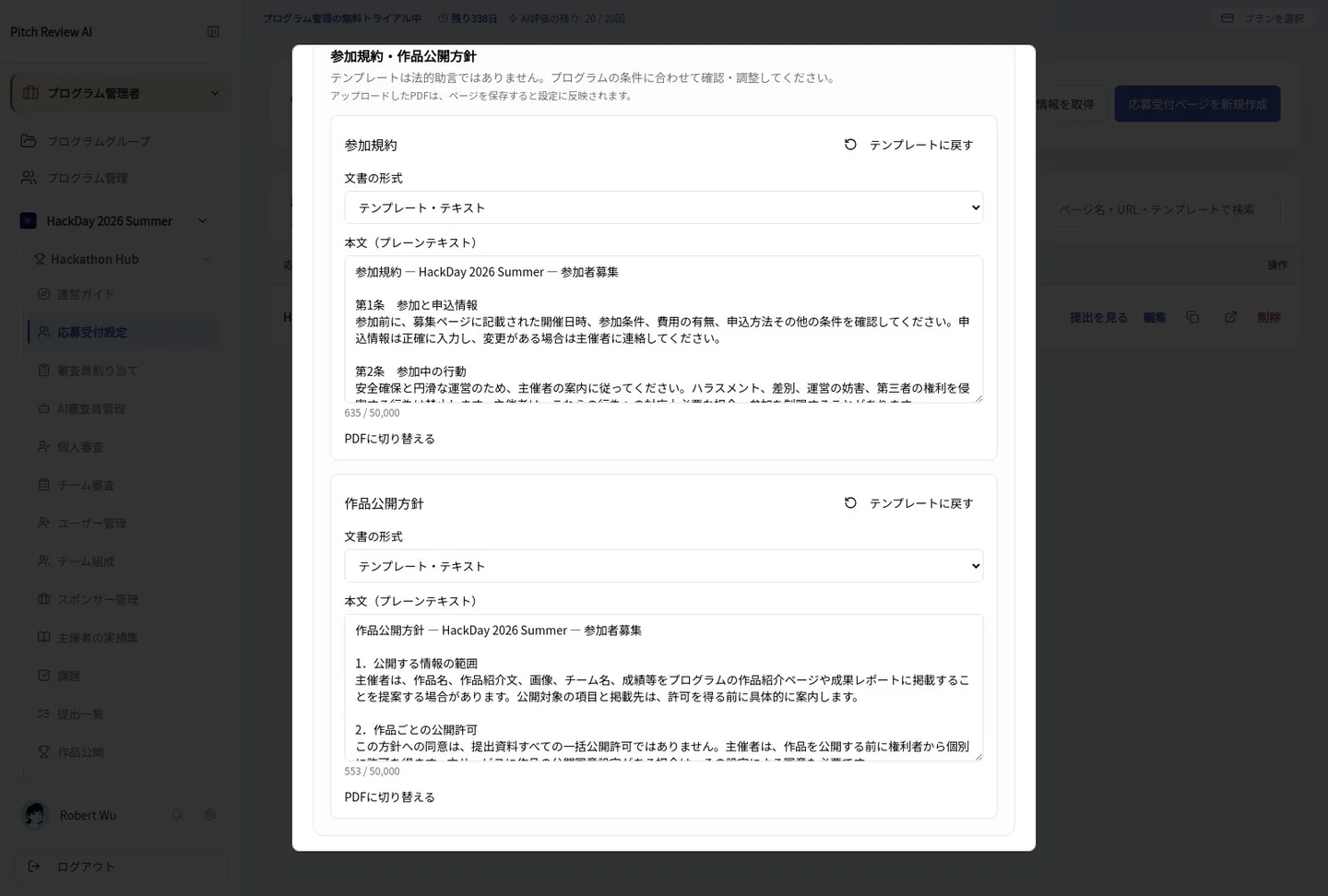
Actual Japanese-interface screenshot: participation documents. Open the image to view it at full size.
Completion checks and precautions
The supplied wording is not legal advice. Review publication scope, contact details and conditions, and obtain professional advice when needed. This feature configures organizer-provided policies; it is not a participant document-submission or permanent-deletion workflow.