Assign a page template and email selected teams
Assign a page template and email selected teams
Assign a saved template to selected teams and send members a team-specific editing link.
Before you begin
Use a program with the relevant feature enabled, or your own settings page. Administrative operations require program management permission; team editing requires active membership and an editable page.
Step-by-step instructions
- Open Works → Page templates and choose Request teams(チームに依頼)for the saved template.
- Review team names, active member counts, current assignments and mail statuses; check the target teams.
- Review the selected template, teams and recipient count in the confirmation dialog. For previously assigned teams, acknowledge the duplicate-email warning before requesting again.
- Confirm the request. It is queued first; subsequent statuses distinguish provider acceptance, failure and uncertain delivery.
- Members open the editing link and sign in with an account belonging to that team. Signed-out visitors see a login prompt.
- If a team already has a draft, its members review and explicitly apply the new format. The request itself does not replace their saved work.
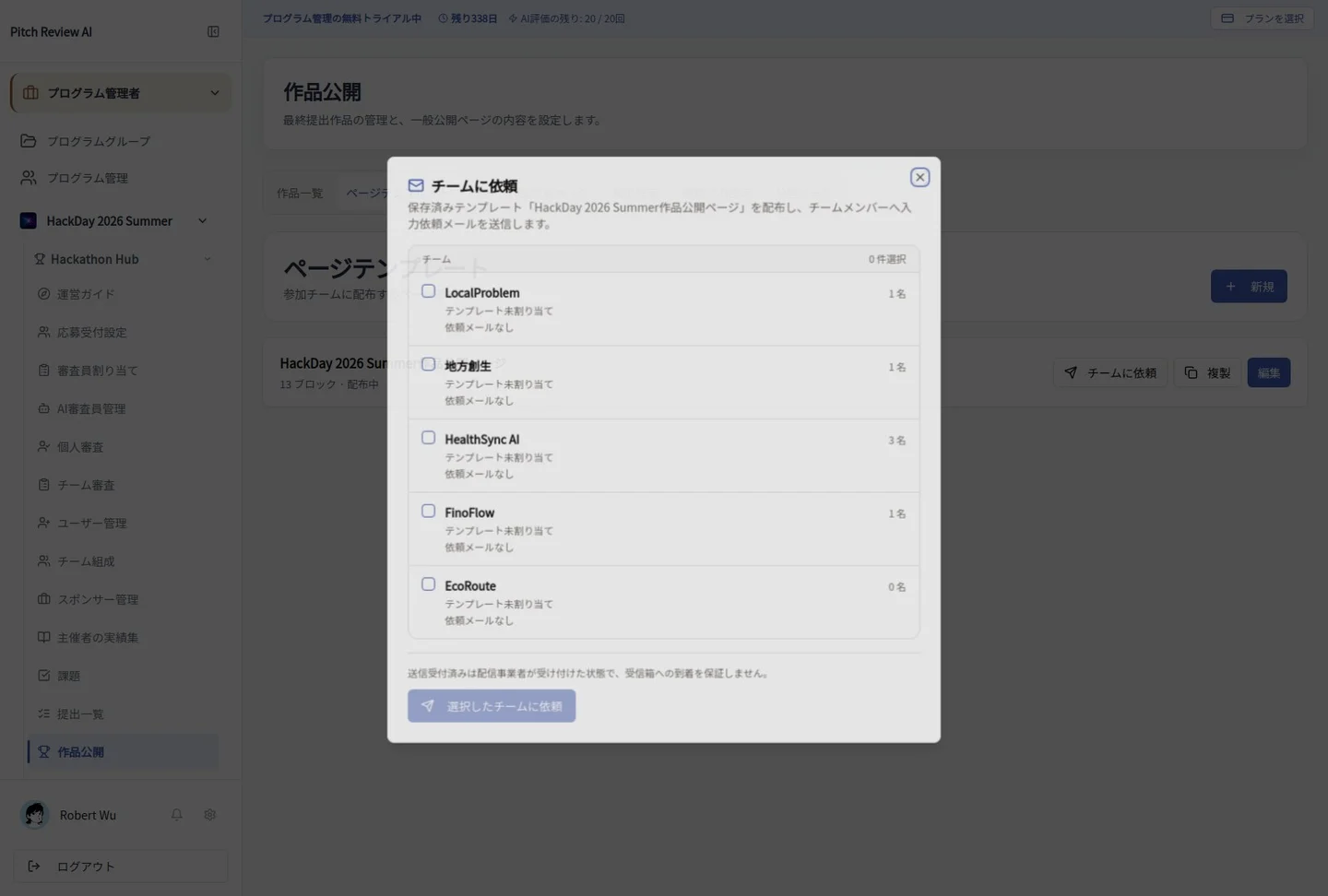
Actual Japanese-interface screenshot: team request. Open the image to view it at full size.
Completion checks and precautions
Existing edit locks, including finalized rankings and passed deadlines, prevent requests. Provider acceptance does not guarantee inbox delivery; uncertain sends are not retried automatically.